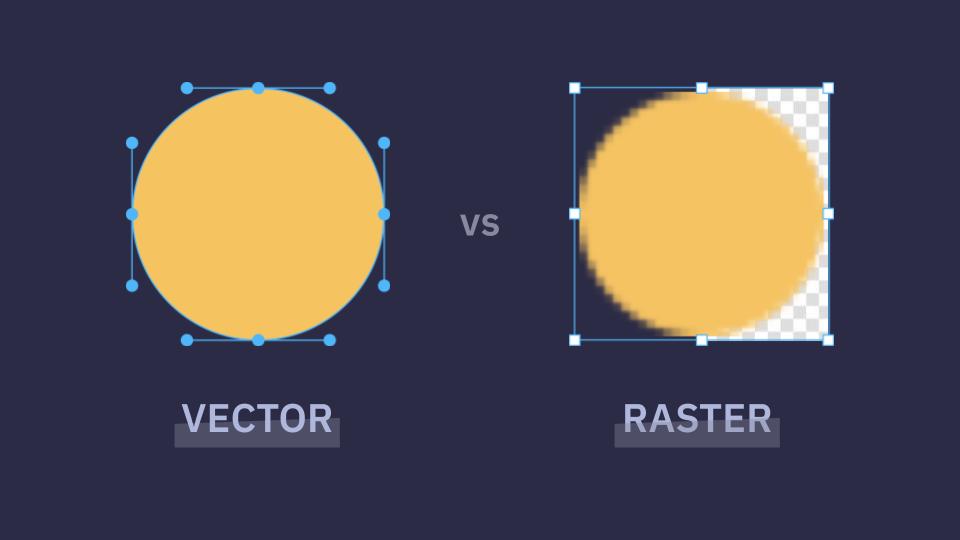
"Raster images are based on physical pixels. They contain explicit color information for every single pixel. What happens is that you send the entire pixel-by-pixel information, and the browser paints each pixel one by one, making the network work harder. This means: they have a fixed resolution (scaling can introduce blurriness), the browser must decode and paint each frame, and animation usually means frame-by-frame playback, like GIFs or video loops."
"Vectors are mathematical instructions that tell the computer how to draw a graphic. As Chris Coyier said in this CSS Conf: "Why send pixels when you can send math?" So, instead of sending the pixels with all the information, SVG sends instructions for how to draw the thing. In other words, let the browser do more and the network do less. Because of this, SVGs: scale infinitely without losing quality, can be styled and manipulated with CSS and JavaScript, and can live directly in the DOM, eliminating that extra HTTP request."
SVG and raster image loaders differ primarily in how they are represented, transmitted, and rendered. Raster images encode color per pixel, require decoding and painting of each frame, have fixed resolution, and typically animate via frame-by-frame playback. Vectors encode drawing instructions, scale without quality loss, and can be styled and animated with CSS and JavaScript. SVG resources can be embedded in the DOM, removing extra HTTP requests and offloading work to the browser instead of the network. For very small, specific loader graphics performance is similar, but SVGs provide superior scalability, crispness, and styling flexibility.
Read at CSS-Tricks
Unable to calculate read time
Collection
[
|
...
]